
Lighting automation for the 'Home Assistant' program (a solution to the problem of accidental light outage)
Topic: Smart Home
Difficulty level: Easy
Why is a simple circuit for turning on the light from the motion sensor inconvenient?
The main problem of automatic lighting control, as you know, is the need to periodically record movement in the room (the interval may be different, depending on the automation settings), otherwise the light will turn off. That is, in the simplest scheme, if the light-off interval is set for a couple of minutes, then every 2 minutes a movement should be recorded. If you have filled the bathroom with water and are going to relax, then such automation will make you periodically wave your hand / foot so that the light does not turn off. If the interval is set, for example, for 10 minutes, then this will greatly simplify the task, but the light in the bathroom will burn for another 10 minutes each time after you leave it. This is also wrong.
The idea of "smart" automation of light:
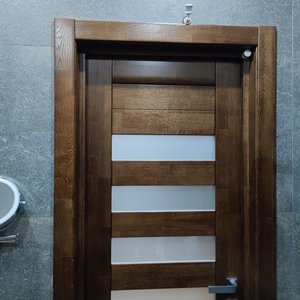
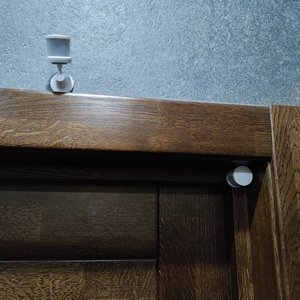
I have been using my idea, which I want to propose, since 2018, I have refined it several times and I can say that it is convenient to use this automation. Its meaning is to install 2 or more modified motion sensors in the room, which will manipulate the program timer. The first motion sensor is placed in the doorway, and its job is to trigger when someone enters or leaves the room - it gives the command to turn on the light (if the light is turned off) and starts the countdown timer for 1 minute. The second sensor is already installed in the room, and switches the countdown timer for, say, 30 minutes, and also restarts this timer every time motion is detected. Thus, when you enter the bathroom (corridor, toilet) the first DD is triggered in the doorway and turns on the light, after which the DD is immediately triggered in the room and switches the timer for 30 minutes, constantly updating this time when motion is detected. You can calmly sit down and watch chats, go to the bathroom and relax, there are 30 minutes before the need to detect the next movement (in practice, this is more than enough, unless of course you fell asleep there))). When leaving the room, the last DD in the doorway is triggered, the timer restarts for 1 minute and after this time the light turns off. Why do we need this minute? Because when detecting movement in the doorway, automation cannot know whether you have entered or exited. A minute is given to wait for motion detection inside the room (maybe you were washing and your wife or child came and left you, and you stayed.. Then within a minute, if there is movement inside the room, the timer will switch back to 30 minutes.
What if an opening sensor is used in the doorway?
A similar scheme can be implemented using a window/door opening sensor in the doorway, but then you always need to make sure that the door remains tightly closed after leaving the room, otherwise the light will often burn for a very long time (depends of course on the automation conditions, but in any case it will not be worked out correctly if the opening sensor does not fix that the door closed). Such a scheme assumes full discipline from all household members, including children, so I refused this option. Well, in my opinion it's inconvenient, sometimes, for example, you just don't want the door to be closed (you wash your face and communicate with your wife or children at the same time, but different situations still)
And what happens if I popped into the bathroom for 5 seconds, for example, took something and immediately left? The sensor in the opening will not work again because of its own blind interval of 1 minute and the timer will count (read - the light will be on) 30 minutes ...?
To do this, the motion sensors must be customized (solder a jumper or draw with a soft pencil) to switch them to a service mode in which they will be able to detect movement every 5 seconds. How to do this can be viewed on the channel at Aliexpress Kvazis: https://www.youtube.com/watch?v=ETfzZhcj0BY Plus, we programmatically block the DD inside the room for these very 5 seconds, so that they do not switch the timer to a 30-minute countdown until the DD in the doorway is ready to detect movement again. Yes, this way we will steal the first 5 seconds to trigger the "long timer", but we will completely exclude cases when the DD in the doorway is not ready to detect movement. How to do this will be a little lower. In addition, I already have new Aqara T1 motion sensors, which can already detect movement once a second out of the box. I'll be testing soon. If this is true, then we will be able to completely eliminate this weak point in automation, while not soldering any jumpers.
And how long will such a customized sensor work from its battery?
In a walk-through place (bathroom, hallway, hallway, etc.), the batteries will last for about a year. This is verified. In normal mode (not customized) can work up to 3 years.
And I have a shower stall, how will the sensor that is inside the room work? Through the glass?
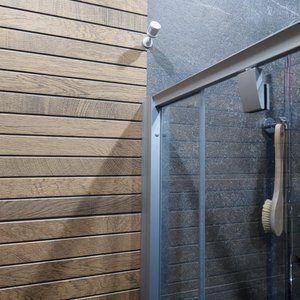
Absolutely not. If there are blind spots such as a shower stall, or a toilet behind a partition / wall, then it is necessary to additionally install motion sensors in these zones, since if you went in and headed there, then in the first 5 seconds you will definitely be there, and in the blind zone the first sensor inside the room will not be able to see you and switch timer for 30 minutes.
Advantages of the proposed lighting automation:
- There is almost no need to generate movement, the light will not turn off until everyone leaves the room;
- Works perfectly for the corridor, hallway, bathroom, toilet, storage room and other non-residential premises;
- No need to close the door tightly, the door does not affect automation in any way at all;
- You can jump into the room for just a couple of seconds and go out, you can be in the room and at the same time other household members will come in and out, the light will work while someone stays inside and will turn off in a minute when everyone leaves the room;
- There may be several doors in the room (corridor, hallway) - automation works in such cases without failures, checked.
Cons:
- You need to customize the motion sensors - this is fine work with a soldering iron, preferably under a magnifying glass. It's not difficult, but it requires a lot of care. Yes, also, another Fresnel lens with a focusing angle of 10 gr is needed in the sensor for the doorway (ordered by Ali, the price today is $ 9.5 for 20 pieces.);
- There is still a small lag in the form of a 5-second delay. A false alarm can occur in 2 cases: 1. You entered and managed to sit on the toilet in 5 seconds and do not move (you went with your head into the smartphone). Remember, 5 seconds after the sensor in the doorway is triggered, we programmatically lock the sensors inside the room so that the DD in the doorway has time to recover and would be ready to work again. 2. Let's say you wash your face, your wife or child comes to you, then they go out and the timer switches for a minute, while you remain indoors and do not move for a minute. In practice, this is also possible, but EXTREMELY rare. The new Aqara T1 sensors may completely eliminate both these disadvantages and the first point with a jumper. I'll be testing soon;
- It will still not work to fully automate the light in the living room (kitchen, bedroom, living room), because no automation can put different expectations of all households, when, for example, someone suddenly sneaked into the kitchen at night... If it's you for a glass of water, then the light should be turned on? Not necessarily? OK, and if it's your elderly relative? Such a question can be solved by turning on the lights on duty, but not everyone has them..
The presentation is finished, it's time to move on to implementation!
We will need (links to equipment at the end of the article):
1. Microcomputer (Raspberry Pi or similar) with the Home Assistant system installed
2. Compatible with aqara ZigBee gateway sensors (for example aqara gateway 3) or ZigBee stick, or SLS
3. Good old Aqara or Mijia motion sensors
4. Fresnel lens for the sensor in the doorway
5. A mini soldering iron with a thin sting and grounding (or a soft simple pencil, but I do not guarantee the stability of work with a drawn jumper), a magnifying glass for soldering. Video instruction from Alex Kvazis: https://www.youtube.com/watch?v=ETfzZhcj0BY
6. Smart switch (I prefer any aqara, especially the new E1 series for a round socket)
7. The actual lamps (preferably smart ones, so that you can set the brightness and temperature of the light depending on the time of day, smooth switching on)
8. A little patience
If you put a regular switch and smart lamps, then you can adjust the temperature of the light and the brightness of the lamps to your wishes. You can also do automation in the ON, which, when the lamp appears online (when power is supplied), will change this temperature and brightness depending on the time of day. True, the delay will be a few seconds (it will turn on with the parameters of the last state of brightness and temperature of light, and as soon as it sees it, then it will apply tinctures based on the current time). But with this option, it is pointless to do automation to turn on the light. If the switch is off and the lights are de-energized...
If you put smart switches, then all brightness and temperature settings will be applied promptly, plus the ability to turn on motion sensors. At the same time, I do not untie the keys from the relay (I do not make them logical) so that it is possible to turn on the light if there are any problems with the smart home server. In lamps (if they have the "automatic restoration of lighting mode" mode, that is, the memory of whether the lamp was turned on at the time of the voltage loss on it or not) - I do NOT turn on this mode. As the wife demands, there should always be option "B". If suddenly something happened to the "smart home" and it does not work (extremely rarely, but it happens), then the ability to control the light (the old-fashioned way) from the switch should remain. If the lamp remembers the condition, then when the voltage is applied to it from the switch, it will not turn on (if it was turned off). Therefore, in the automation under consideration, the light is controlled by motion sensors and a program timer (we do not touch the switch, it is simply in the on position). Even if it is turned off and the smart lamps are de-energized, then when the movement is fixed, automation will turn on the switch (it is also smart - read controlled), the bulbs will instantly light up (when the memory is switched off to the previous state). And as a last resort (failure of the smart home system) they will obediently turn on and off from the supply / loss of voltage when the switch is pressed.
lvl_1_light:

    timer:

        shower_1nd:


    automation:

    ## Turning on the light short

    - alias: 1nd_hallway_light_on_short

      trigger:

        - platform: event

          event_type: xiaomi_aqara.motion

          event_data:

            entity_id: binary_sensor.0x00158d000484defd_motion ## ДД Short (in the doorway with a fresnel lens)

      action:

        - service: switch.turn_on

          entity_id: switch.0x54ef4410000f37fa_channel_1

        - service: timer.start ## Starting a short timer

          entity_id: timer.shower_1nd

          data_template:

           duration: '00:01:00'

        - service: automation.turn_off

          entity_id:

            - automation.1nd_hallway_light_on_long

        - delay: '00:00:06'

        - service: automation.turn_on

          entity_id:

            - automation.1nd_hallway_light_on_long


    ## Maintaining the light

    - alias: 1nd_hallway_light_on_long

      trigger:

        - platform: event

          event_type: xiaomi_aqara.motion

          event_data:

            entity_id: binary_sensor.54ef44e325ec_motion # ДД long above the door

        - platform: event

          event_type: xiaomi_aqara.motion

          event_data:

            entity_id: binary_sensor.0x00158d00030298a7_motion # ДД long shower/bathroom

      action:

        - service: switch.turn_on

          entity_id: switch.0x54ef4410000f37fa_channel_1

        - service: timer.start

          entity_id: timer.shower_1nd

          data_template:

           duration: '00:30:00'


    ## Turning off the light

    - alias: 1nd_hallway_light_off

      trigger:

      - platform: event

        event_type: timer.finished

        event_data:

          entity_id: timer.shower_1nd

      action:

        - service: switch.turn_off

          entity_id:

            - switch.0x54ef4410000f37fa_channel_1


    # Checking the light timer (if the voltage was turned off/other situations)

    - alias: 1nd_hallway_light_timer_chek

      trigger:

        - platform: time_pattern

          minutes: '/1'

      condition:

      - condition: state

        entity_id: timer.shower_1nd

        state: 'idle'

      - condition: state

        entity_id: group.hallwaylight

        state: 'on'

      action:

        - service: switch.turn_off

          entity_id:

            - switch.0x54ef4410000f37fa_channel_1
Addition:
Recently, many new motion sensors have appeared, for example, the aqara T1, which already knows how to react to movement every 2 seconds out of the box, and the ultra-sensitive aqara RTCGQ13LM sensor (also reacting 2 seconds). Using them, there is no need to solder a jumper inside the sensor. The number of false blackouts is reduced to almost zero. At the same time, the logic of the above program does not change.
There are also microwave and combined motion sensors, but here you need to pay attention that if the microwave sensor is located close to the entrance to the room, the light can turn on when you just pass by, since it works both through glass and through thin obstacles or cracks (for example, a slightly ajar door).
Motion sensor on AliExpress:
https://aliexpress.ru/wholesale?searchText=sensor+motion%20aqara
Fresnel Lens on AliExpress:
https://a.aliexpress.com/_AWYF1m
Guys who have read to the end - thank you! This is my first article on automation, thank you! On this site, anyone can write their own article, offer their own options for various automations, just register and write. I will be pleased that this site is not in vain, and you will be able to help many novice enthusiasts build their smart home...
Article rating: 0 Register for evaluation.
date of publication: 14-Feb-2022 8:54,